
Home Sweet Tab
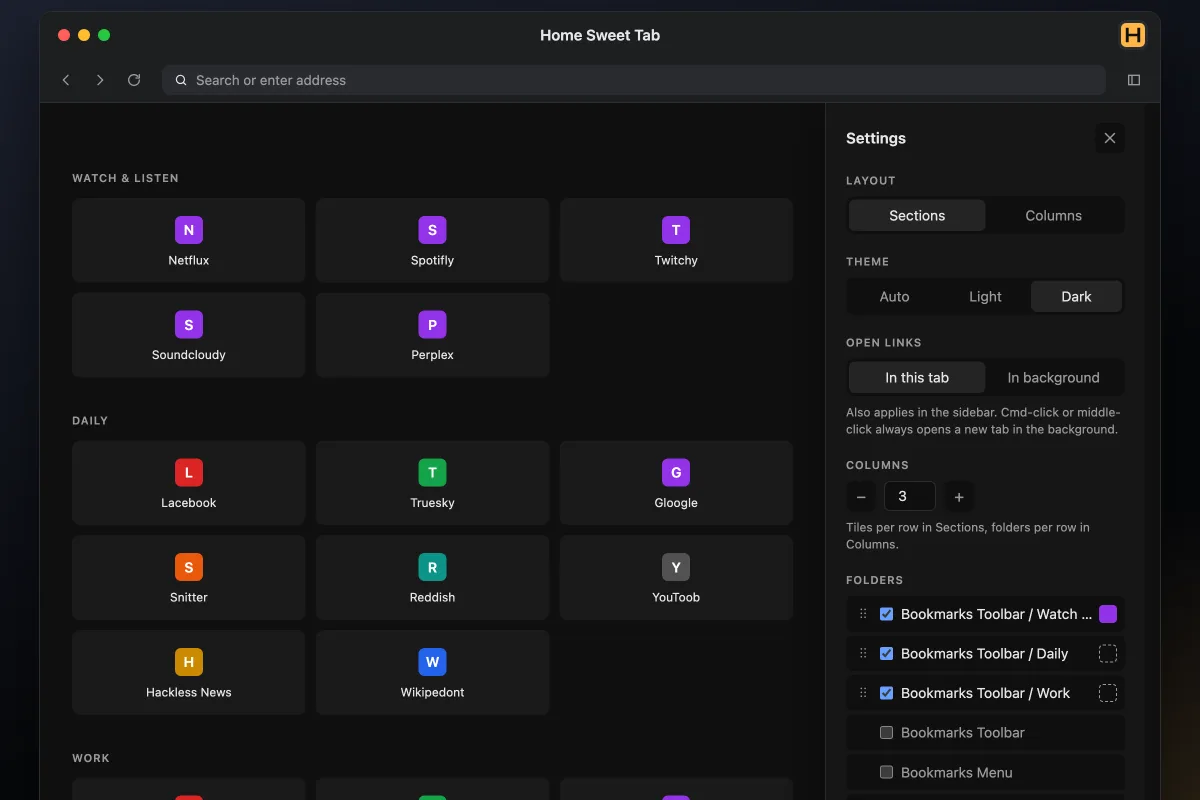
Home Sweet Tab is a Firefox add-on that replaces the new tab page with the bookmark folders you choose, in the order you set. Show them as grids of tiles or as columns of links, colour each icon, open the same folders in the sidebar, and pick a light or dark theme. It reads only your bookmarks and sends nothing anywhere.
What problem does it solve?
Firefox’s new tab fills up with shortcuts, stories and a search box you may never use. Home Sweet Tab clears all of that and shows only the bookmark folders you pick, so the links you open every day sit one click away.
How it works
Pick the folders you want and put them in any order. Sections show each folder as a grid of tiles, and Columns show each folder as a list of links side by side. Every bookmark gets a coloured square with its first letter, and a folder colour overrides the bookmarks inside it.
The same folders open in Firefox’s sidebar with Alt+Shift+H, or Control+Shift+H on a Mac. Links open in the current tab or a background tab, and edits to your bookmarks show up right away.
Whom it’s for
Firefox users who keep their sites in bookmark folders and want a calm new tab with nothing else on it.
Tech
A Manifest V3 Firefox add-on in plain HTML, CSS and JavaScript, for Firefox 142 and up. It asks only for bookmarks and storage access, keeps its settings in the browser and makes no network requests.
Frequently asked questions
What is Home Sweet Tab?
A Firefox add-on that turns your new tab into the bookmark folders you pick. There is no news feed, search box, weather or account.
How can the folders look?
Sections show each folder as a grid of tiles. Columns show each folder as a list of links, side by side. You set how many tiles or folders sit in a row, from 1 to 12.
Can I change the icons?
Every bookmark gets a coloured square. Pick one of 32 colours or any custom colour, give a whole folder one colour, and show or hide the first letter.
Is there a sidebar?
Yes. The same folders open as a stacked list in Firefox's sidebar with Alt+Shift+H, or Control+Shift+H on a Mac.
Does it collect any data?
No. It reads your bookmarks, keeps its settings in your browser and fetches no icons from websites.
Is it free?
Yes. Install it from Firefox Add-ons.
Related projects
- Brand Slam · Turn any website into a brand kit
- Typechase · Find and download a page's web fonts