

Settings Overview
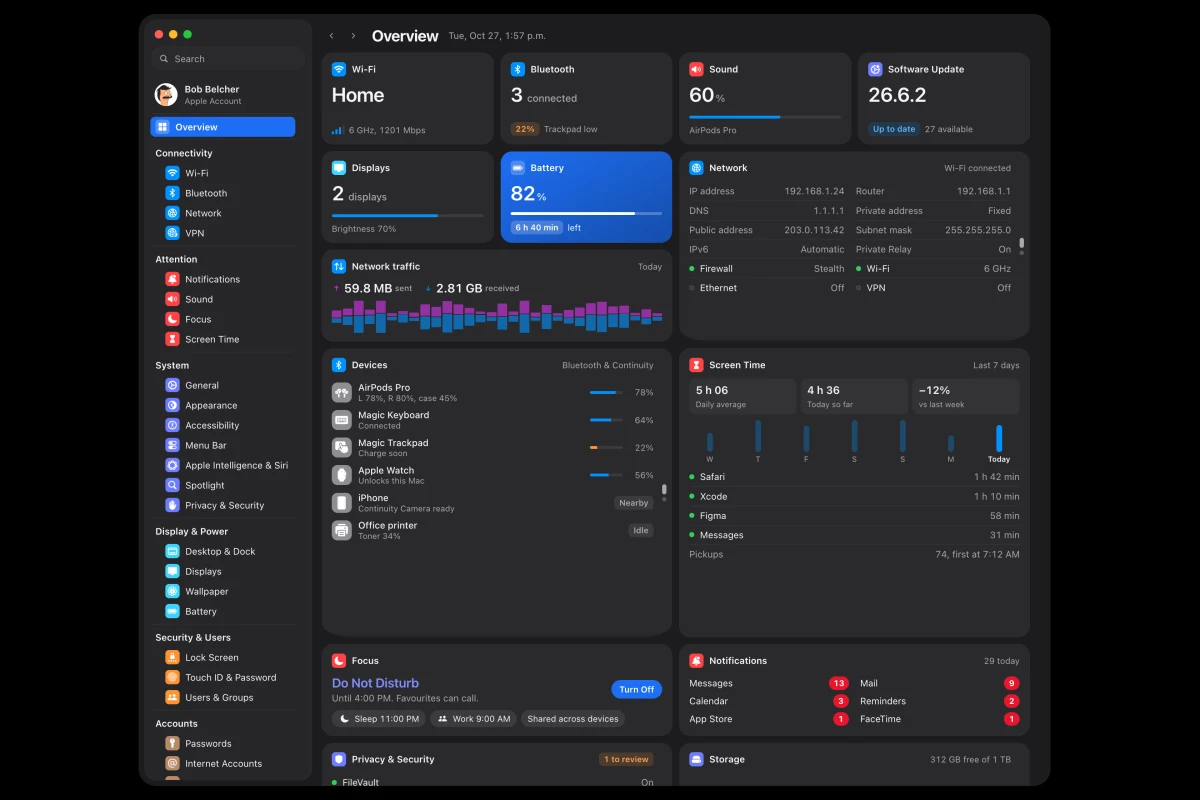
Settings Overview is a concept for macOS 26 System Settings. Every pane Apple ships stays as it is, and a column beside it shows what that setting is doing right now. The sidebar groups panes under named categories with one colour each, and an Overview and category dashboards put the whole Mac on one screen.
What problem does it solve?
System Settings tells you what you can change. It almost never tells you what is happening. Is something draining the battery? Which app used the camera this morning? The answers sit a sheet deeper, or in a third-party app. Settings Overview keeps every pane as Apple ships it and adds the missing half beside it.
How it works
Open any pane and a column of widgets shows what that setting is doing right now, from live connections on Network to cycle history on Battery. Groups in the sidebar have names again, and each takes one colour. Overview opens first with the whole Mac on one screen, and each category title opens a dashboard for its group. Edit Widgets lets you choose what you see, and one button hides the column for the Settings you know.
Whom it’s for
Mac users who check Settings to understand their machine, not only to change it, and designers curious about what a status-first System Settings could look like.
Tech
A static web prototype in plain HTML, CSS and JavaScript, with SF Symbols and Apple’s system colours. 32 panes, 191 pages and 320 widgets, all running locally in the browser.
Frequently asked questions
Is this a real app?
No. It is a clickable concept that runs in the browser with sample data for a fictional family.
Does it change Apple's panes?
No. Every pane is replicated as macOS 26 shows it. The widgets sit in their own column beside it.
Can I hide the widgets?
Yes. A button at the top right hides the column, and Settings works as it does today.
Does it work on a phone?
It is built for desktop screens, like the app it reimagines.