
LUT Herr King
LUT Herr King applies a colour lookup table or a Lightroom preset to an image without leaving the browser tab. It reads .cube, .3dl, .csp, HALD png, .xmp and .lrtemplate, layers Light, Colour and Effects sliders on top, shows a before and after split, extracts the resulting colour scheme, and exports a full-resolution PNG or a baked .cube.
What problem does it solve?
LUT packs and Lightroom presets are sold everywhere, but trying one on your own image needs an app that understands the format. Resolve and Premiere take .cube, Lightroom takes its own presets, nothing takes a HALD png without a plugin, and every one of them wants a licence or a subscription before you find out whether the look suits the shot. LUT Herr King reads all of them and shows the result on your image in seconds, in a browser tab, with nothing sent to a server.
How it works
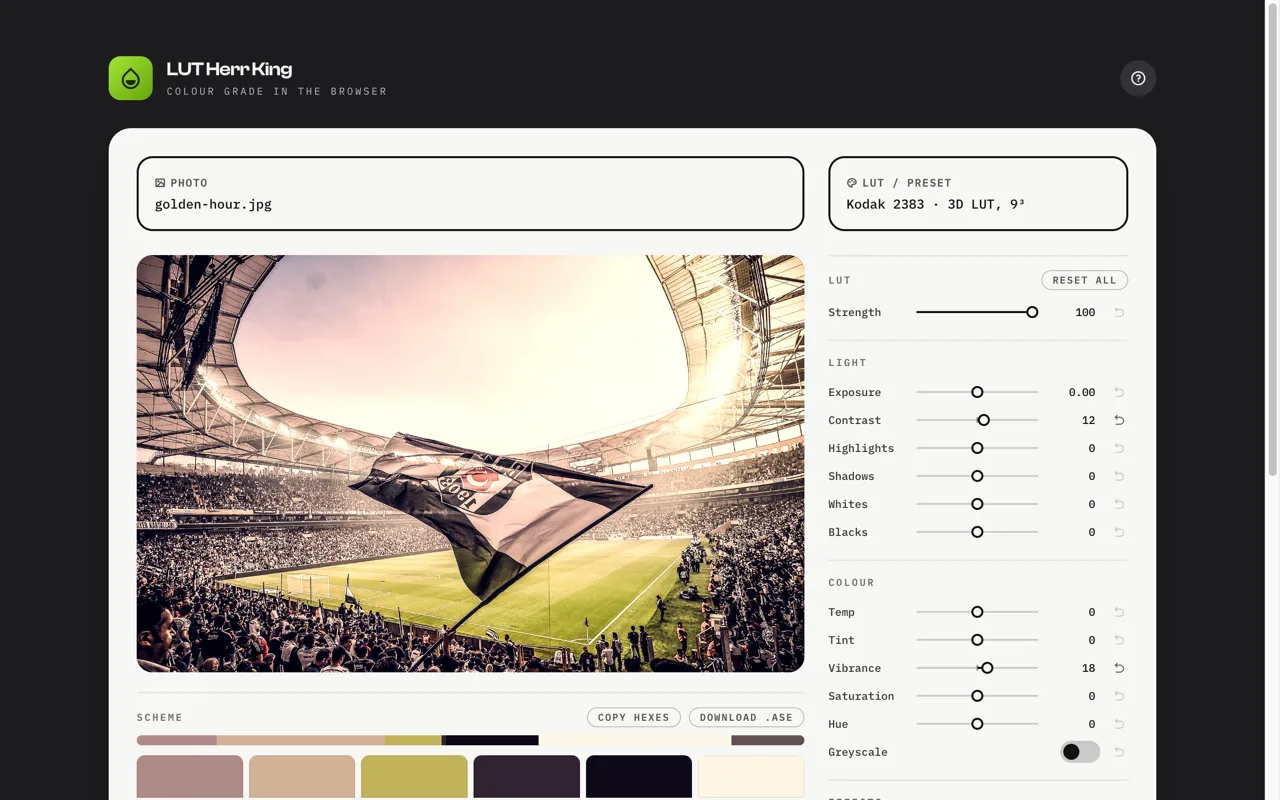
Drop an image and a LUT or preset. The grade is computed on a canvas using trilinear interpolation through the cube. Lightroom presets are parsed for their slider values and evaluated on a 33-point grid to produce an equivalent cube, with embedded Adobe profile tables decoded from the XMP. A panel of Light, Colour and Effects sliders runs on top of the LUT, with exposure applied in linear light the way Lightroom does it. Press the image to peek at the original, or open a draggable before and after split. Under the image, the colour scheme of the result is grouped by hue family with darks, lights and neutrals, ready to copy or export. Download a full-resolution PNG, or bake the LUT and your colour adjustments into a .cube for use elsewhere.
Whom it’s for
Anyone with a folder of LUTs and no app that opens them. Photographers evaluating a preset pack before paying for more. Designers who want the colour scheme a grade produces. Colourists who need a quick sanity check on a .cube away from the suite.
Tech
Single static HTML page in vanilla JavaScript. Canvas 2D for rendering, Float32 cube tables with trilinear sampling, a 256-entry tone table for the slider pipeline. Parsers for .cube, .3dl, .csp, HALD png, .xmp and .lrtemplate, plus a decoder for Adobe’s RGBTable format verified against the DNG SDK. Adobe .ase writer for the scheme. IndexedDB and localStorage keep the session in the browser. No server, no data leaves the tab.
Frequently asked questions
What does LUT Herr King do?
It applies a LUT or Lightroom preset to an image in the browser, lets you adjust the result, and exports a PNG or a .cube file. Nothing is uploaded.
Which LUT formats work?
.cube in 1D and 3D, Autodesk .3dl, Cinespace .csp, HALD CLUT .png, and Lightroom presets saved as .xmp or .lrtemplate.
How accurate are Lightroom presets?
Close, not exact. White balance, exposure, contrast, tone curves, HSL, vibrance, saturation, colour grading and embedded profile tables carry over. Highlights and shadows carry over in part, since Lightroom applies them edge by edge. Clarity, texture, dehaze, grain, vignette and masks do not carry over, because they depend on where a pixel sits rather than what colour it is.
What is a HALD png?
A 3D LUT stored as an image. You run a neutral HALD image through any editor, save the result as PNG, and the pixels now describe the colour transform. LUT Herr King reads it like a .cube.
Can I export my adjustments?
Yes. Download a full-resolution PNG, or export a 33-point .cube that bakes the loaded LUT and the Light and Colour sliders into one file for Resolve, Premiere, Photoshop or this page. Grain, vignette and sharpen are spatial, so they stay out of the cube.
What is the colour scheme section?
One swatch per hue family present in the graded image, plus darks, lights and neutrals, each with hex and share. Click to copy a single swatch, or take the set as comma-separated hex or an Adobe .ase swatch file.
Does it upload my image?
No. Everything runs on a canvas in your tab. Your image, LUT and settings are kept in the browser so a reload does not lose them, and nothing is sent anywhere.
Is it free?
Yes. No signup, no ads, no subscription.