
Irogasane
Irogasane is a native Mac app for building colour palettes. Start from one colour and turn it into scales, harmonies, blends and a twelve-step theme, then check every pair against WCAG 2 and APCA. Palettes save as you go, stay on your Mac and export as ASE, SVG or CSS.
What problem does it solve?
Building a palette usually means hopping between a picker, a generator, a contrast checker and a notes file. Irogasane keeps the whole job in one window. Start from one colour, grow it into the colours that go with it, and check that every pair reads well before it reaches a design file.
How it works
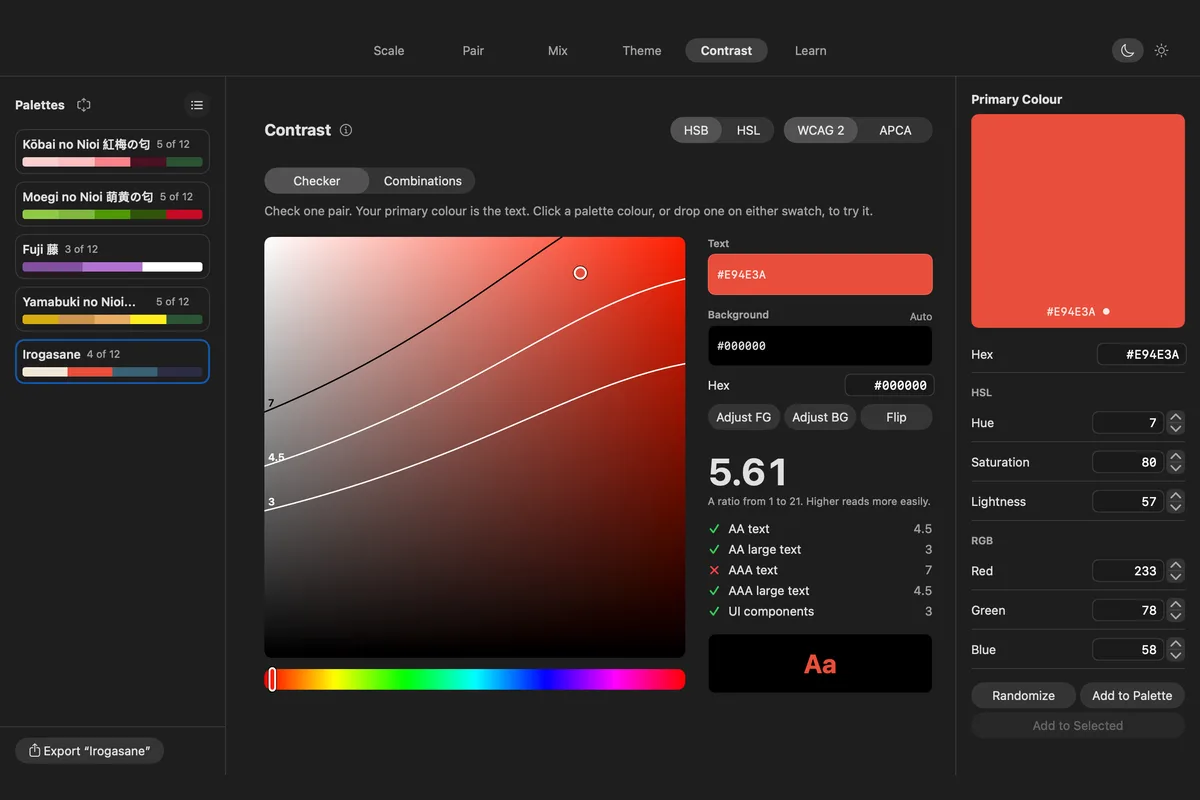
Six tabs share one primary colour. Scale turns it into shades, tints, tones and hue steps. Pair builds complementary, triadic and other harmonies around it. Mix blends between colours on a board of 72 cells. Theme makes primary, neutral and status colours in twelve steps each. Contrast checks any pair against WCAG 2 and APCA, with curves that show where each pass mark lies. Learn has short lessons that use your own colour.
Palettes hold up to 12 colours, save as you go with undo, and export as ASE, SVG or CSS. Twenty-three starter palettes come with the app.
Whom it’s for
Designers who build colour systems and want to see harmony and contrast side by side, and anyone who has to make a brand colour pass accessibility checks without losing its character.
Tech
Native macOS app built in Swift and SwiftUI, for macOS 15.5 and later. The colour maths is a port of chroma.js with the APCA-W3 contrast model. The app is sandboxed with no network access. The build is not notarized, so the first launch needs manual authorization. Free to download from GitHub.
Frequently asked questions
What is Irogasane?
A native Mac app for building colour palettes. It turns one colour into scales, harmonies, blends and a full theme, and checks that your pairs read well.
Which contrast standards does it check?
WCAG 2 contrast ratios and APCA lightness contrast. Adjust FG and Adjust BG fix a failing pair by changing lightness only, so the hue stays yours.
Which Macs does it run on?
Any Mac running macOS 15.5 Sequoia or later.
Does it collect any data?
No. The app has no network access, so your palettes never leave your Mac.
What does the name mean?
Irogasane (色襲) means layered colours, after the old practice of wearing colours in layers so their edges show together.